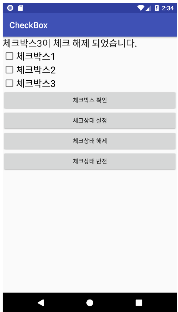
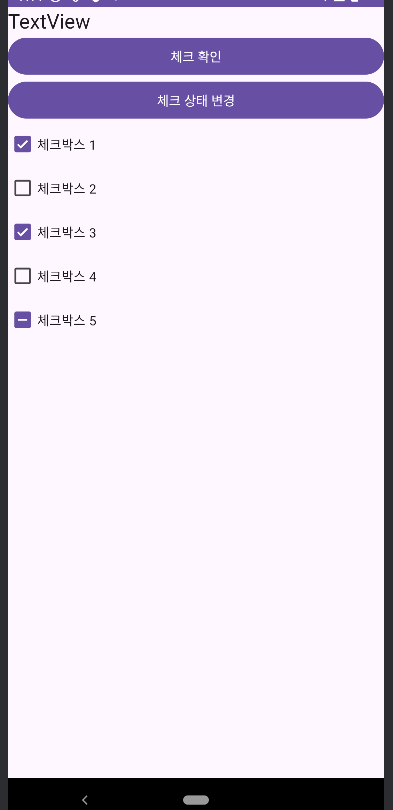
선택할 수 있는 항목 들을 제공하고 체크를 통해 선택할 수 있도록 하는 View 다수의 CheckBox를 동시에 선택할 수 있다.
1.CheckBox 의 주요 속성
- text : CheckBox에 표시되는 문자열을 설정한다. - checked : true로 설정하면 체크 되어 있는 상태가 되고 false를 설정하거나 삭제하면 체크되어 있지 않는 상태가 된다. - checkedState :Material 3 에 추가된 속성. 체크 상태 3단계로 나눠서 설정할 수 있다. -checked : 체크된 상태 -unchecked : 체크 안되 상태 -indeterminate : - 로 표시되며 체크 박스들 중 선택 안된게 있을 경우 표시하는 용도로 사용한다.
2. CheckBox의 주요 메서드
isChecked : 체크 박스의 현재 체크 값 setChecked : 체크 박스의 현재 체크 상태를 설정한다. toggle : 현재 체크 상태를 반전시킨다.
3. CheckBox의 주요 프로퍼티 - isChecked : 체크 여부를 설정한다 true/false - checkedState : MaterialCheckBox의 것이며 3가지 값 중 하나를 설정하여 체크 상태를 설정한다. STATE_UNCHECKED : 체크된 상태 STATE_UNCHECKED : 체크 안되 상태 STATE_INDETERMINATE : - 로 표시되며 체크 박스들 중 선택 안된게 있을 경우 표시하는 용도로 사용한다.
4. CheckBox의 주요 리스너 - setOnCheckedChangeListener : 체크 여부가 변경되었을 때 - addOnCheckedStateChangedListener : 체크 상태가 변경되었을 때(MaterialCheckBox 것)
▼Android Studio 에서 CheckBox를 사용해보자 !!!
package kr.co.lion.android17_checkbox
import androidx.appcompat.app.AppCompatActivity
import android.os.Bundle
import com.google.android.material.checkbox.MaterialCheckBox
import kr.co.lion.android17_checkbox.databinding.ActivityMainBinding
class MainActivity : AppCompatActivity() {
lateinit var activityMainBinding: ActivityMainBinding
override fun onCreate(savedInstanceState: Bundle?) {
super.onCreate(savedInstanceState)
activityMainBinding = ActivityMainBinding.inflate(layoutInflater)
setContentView(activityMainBinding.root)
activityMainBinding.apply{
button.setOnClickListener {
val a1 = getCheckedString(checkBox1.isChecked)
val a2 = getCheckedState((checkBox1 as MaterialCheckBox).checkedState)
textView.text = "Check1 checked : $a1 \n"
textView.append("checked1 state : $a2 \n")
val a3 = getCheckedString(checkBox2.isChecked)
val a4 = getCheckedState((checkBox2 as MaterialCheckBox).checkedState)
textView.append("Check2 checked : $a3 \n")
textView.append("checked2 state : $a4 \n")
val a5 = getCheckedString(checkBox3.isChecked)
val a6 = getCheckedState((checkBox3 as MaterialCheckBox).checkedState)
textView.append("Check3 checked : $a5 \n")
textView.append("checked3 state : $a6 \n")
val a7 = getCheckedString(checkBox4.isChecked)
val a8 = getCheckedState((checkBox4 as MaterialCheckBox).checkedState)
textView.append("Check4 checked : $a7 \n")
textView.append("checked4 state : $a8 \n")
val a9 = getCheckedString(checkBox5.isChecked)
val a10 = getCheckedState((checkBox5 as MaterialCheckBox).checkedState)
textView.append("Check5 checked : $a9 \n")
textView.append("checked5 state : $a10 \n")
}
button2.setOnClickListener {
checkBox1.isChecked = false
checkBox2.isChecked = true
(checkBox3 as MaterialCheckBox).checkedState = MaterialCheckBox.STATE_UNCHECKED
(checkBox4 as MaterialCheckBox).checkedState = MaterialCheckBox.STATE_CHECKED
(checkBox5 as MaterialCheckBox).checkedState = MaterialCheckBox.STATE_INDETERMINATE
}
// 리스너
// 체크 여부가 변경되었을 때
// 두 번쨰 : 설정된 체크 여부
checkBox1.setOnCheckedChangeListener { buttonView, isChecked ->
textView.text = when(isChecked){
true -> "checkBox41이 체크 되었습니다"
false -> "checkBox41이 체크 해제 되었습니다"
}
}
// 두 번째
(checkBox5 as MaterialCheckBox).addOnCheckedStateChangedListener { checkBox, state ->
textView.text = when(state){
MaterialCheckBox.STATE_CHECKED -> "checkBox5가 체크 되었습니다"
MaterialCheckBox.STATE_UNCHECKED -> "checkBox5가 체크 해제되었습니다"
MaterialCheckBox.STATE_INDETERMINATE -> "checkBox5가 빼기 상태가 되었습니다"
else -> ""
}
}
}
}
fun getCheckedString(checked:Boolean) = when(checked){
true -> "체크 되어 있습니다"
false -> "체크 되어있지 않습니다"
}
fun getCheckedState(checkedState:Int) = when(checkedState){
MaterialCheckBox.STATE_CHECKED -> "체크 되어 있습니다"
MaterialCheckBox.STATE_UNCHECKED -> "체크 되어있지 않습니다"
MaterialCheckBox.STATE_INDETERMINATE -> "뺴기로 설정되어 있습니다"
else -> ""
}
}