Android
[Adroid-] Material3 - CardView
연나연
2024. 1. 24. 13:21

https://m3.material.io/components/cards/overview
Cards – Material Design 3
Cards contain content and actions about a single subject.
m3.material.io
화면에 배치되는 View 들을 그룹으로 묶어 관리할 수 있는 View 이다.
CardView 자체에 그림자를 두어 약간 공중에 떠있는 듯한 모습을 보여줄 수 있다.
Style
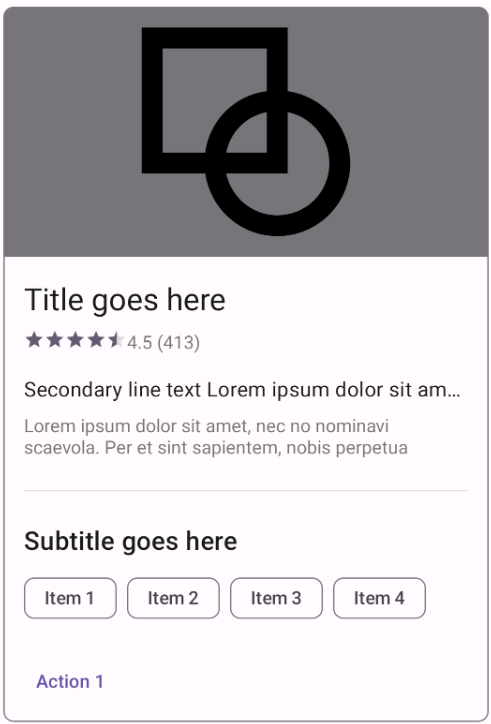
▶ Outlined
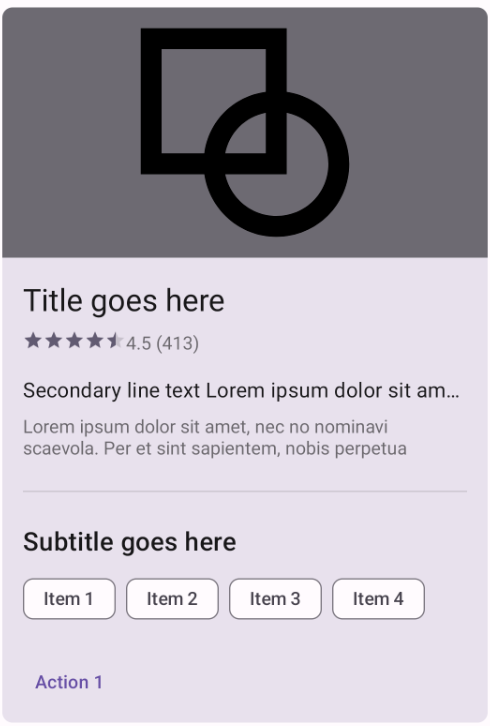
▶ Filled
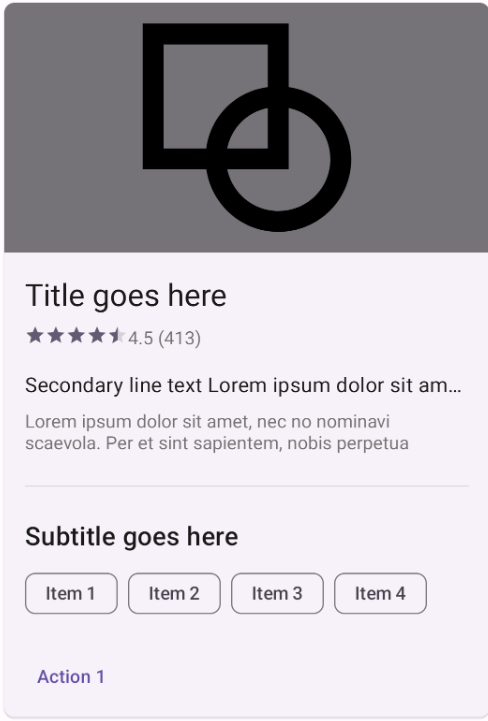
▶ Elevated
CardView의 주요 속성
contentPadding : CardView 내부의 여백을 설정한다.
cardCornerRadius : CardView 모서리 부분의 둥근 정도를 설정한다.
cardElevation : CardView가 공중에 떠있는 정도를 설정한다.
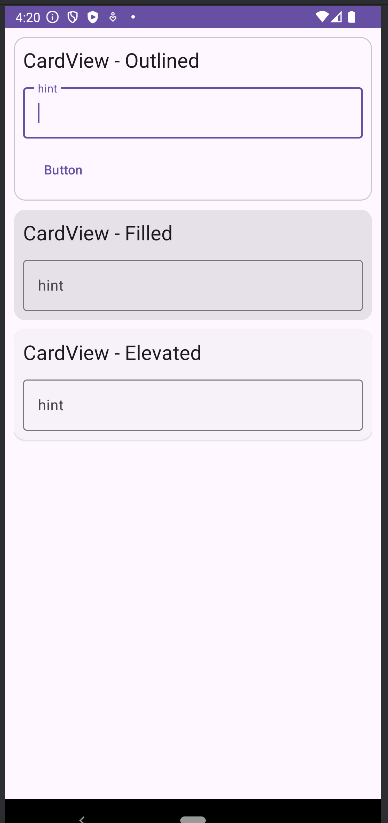
<?xml version="1.0" encoding="utf-8"?> <LinearLayout xmlns:android="http://schemas.android.com/apk/res/android" xmlns:app="http://schemas.android.com/apk/res-auto" xmlns:tools="http://schemas.android.com/tools" android:layout_width="match_parent" android:layout_height="match_parent" android:orientation="vertical" android:padding="10dp" tools:context=".MainActivity" > <com.google.android.material.card.MaterialCardView android:layout_width="match_parent" android:layout_height="wrap_content" android:padding="10dp" > <LinearLayout android:layout_width="match_parent" android:layout_height="match_parent" android:orientation="vertical" android:padding="10dp"> <TextView android:id="@+id/textView" android:layout_width="match_parent" android:layout_height="wrap_content" android:text="CardView - Outlined " android:textAppearance="@style/TextAppearance.AppCompat.Large" /> <com.google.android.material.textfield.TextInputLayout android:layout_width="match_parent" android:layout_height="match_parent" android:layout_marginTop="10dp"> <com.google.android.material.textfield.TextInputEditText android:layout_width="match_parent" android:layout_height="wrap_content" android:hint="hint" /> </com.google.android.material.textfield.TextInputLayout> <Button android:id="@+id/button2" style="@style/Widget.Material3.Button.TextButton" android:layout_width="wrap_content" android:layout_height="wrap_content" android:layout_marginTop="10dp" android:text="Button" /> </LinearLayout> </com.google.android.material.card.MaterialCardView> <com.google.android.material.card.MaterialCardView style="@style/Widget.Material3.CardView.Filled" android:layout_width="match_parent" android:layout_height="wrap_content" android:layout_marginTop="10dp" android:padding="10dp" > <LinearLayout android:layout_width="match_parent" android:layout_height="match_parent" android:orientation="vertical" android:padding="10dp"> <TextView android:id="@+id/textView2" android:layout_width="match_parent" android:layout_height="wrap_content" android:text="CardView - Filled" android:textAppearance="@style/TextAppearance.AppCompat.Large" /> <com.google.android.material.textfield.TextInputLayout android:layout_width="match_parent" android:layout_height="match_parent" android:layout_marginTop="10dp"> <com.google.android.material.textfield.TextInputEditText android:layout_width="match_parent" android:layout_height="wrap_content" android:hint="hint" /> </com.google.android.material.textfield.TextInputLayout> </LinearLayout> </com.google.android.material.card.MaterialCardView> <com.google.android.material.card.MaterialCardView style="@style/Widget.Material3.CardView.Elevated" android:layout_width="match_parent" android:layout_height="wrap_content" android:layout_marginTop="10dp" android:padding="10dp" > <LinearLayout android:layout_width="match_parent" android:layout_height="match_parent" android:orientation="vertical" android:padding="10dp"> <TextView android:id="@+id/textView3" android:layout_width="match_parent" android:layout_height="wrap_content" android:text="CardView - Elevated" android:textAppearance="@style/TextAppearance.AppCompat.Large" /> <com.google.android.material.textfield.TextInputLayout style="text" android:layout_width="match_parent" android:layout_height="match_parent" android:layout_marginTop="10dp"> <com.google.android.material.textfield.TextInputEditText android:layout_width="match_parent" android:layout_height="wrap_content" android:hint="hint" /> </com.google.android.material.textfield.TextInputLayout> </LinearLayout> </com.google.android.material.card.MaterialCardView> </LinearLayout>실습해보자
▼ activity_main.xml
<?xml version="1.0" encoding="utf-8"?> <LinearLayout xmlns:android="http://schemas.android.com/apk/res/android" xmlns:app="http://schemas.android.com/apk/res-auto" xmlns:tools="http://schemas.android.com/tools" android:layout_width="match_parent" android:layout_height="match_parent" android:orientation="vertical" android:padding="10dp" tools:context=".MainActivity" > <com.google.android.material.card.MaterialCardView android:layout_width="match_parent" android:layout_height="wrap_content" android:padding="10dp" > <LinearLayout android:layout_width="match_parent" android:layout_height="match_parent" android:orientation="vertical" android:padding="10dp"> <TextView android:id="@+id/textView" android:layout_width="match_parent" android:layout_height="wrap_content" android:text="CardView - Outlined " android:textAppearance="@style/TextAppearance.AppCompat.Large" /> <com.google.android.material.textfield.TextInputLayout android:layout_width="match_parent" android:layout_height="match_parent" android:layout_marginTop="10dp"> <com.google.android.material.textfield.TextInputEditText android:layout_width="match_parent" android:layout_height="wrap_content" android:hint="hint" /> </com.google.android.material.textfield.TextInputLayout> <Button android:id="@+id/button2" style="@style/Widget.Material3.Button.TextButton" android:layout_width="wrap_content" android:layout_height="wrap_content" android:layout_marginTop="10dp" android:text="Button" /> </LinearLayout> </com.google.android.material.card.MaterialCardView> <com.google.android.material.card.MaterialCardView style="@style/Widget.Material3.CardView.Filled" android:layout_width="match_parent" android:layout_height="wrap_content" android:layout_marginTop="10dp" android:padding="10dp" > <LinearLayout android:layout_width="match_parent" android:layout_height="match_parent" android:orientation="vertical" android:padding="10dp"> <TextView android:id="@+id/textView2" android:layout_width="match_parent" android:layout_height="wrap_content" android:text="CardView - Filled" android:textAppearance="@style/TextAppearance.AppCompat.Large" /> <com.google.android.material.textfield.TextInputLayout android:layout_width="match_parent" android:layout_height="match_parent" android:layout_marginTop="10dp"> <com.google.android.material.textfield.TextInputEditText android:layout_width="match_parent" android:layout_height="wrap_content" android:hint="hint" /> </com.google.android.material.textfield.TextInputLayout> </LinearLayout> </com.google.android.material.card.MaterialCardView> <com.google.android.material.card.MaterialCardView style="@style/Widget.Material3.CardView.Elevated" android:layout_width="match_parent" android:layout_height="wrap_content" android:layout_marginTop="10dp" android:padding="10dp" > <LinearLayout android:layout_width="match_parent" android:layout_height="match_parent" android:orientation="vertical" android:padding="10dp"> <TextView android:id="@+id/textView3" android:layout_width="match_parent" android:layout_height="wrap_content" android:text="CardView - Elevated" android:textAppearance="@style/TextAppearance.AppCompat.Large" /> <com.google.android.material.textfield.TextInputLayout style="text" android:layout_width="match_parent" android:layout_height="match_parent" android:layout_marginTop="10dp"> <com.google.android.material.textfield.TextInputEditText android:layout_width="match_parent" android:layout_height="wrap_content" android:hint="hint" /> </com.google.android.material.textfield.TextInputLayout> </LinearLayout> </com.google.android.material.card.MaterialCardView> </LinearLayout>
실행결과